Concept map
Multiple concepts, named relationships, and cross-links. Use it to explain systems, theories, causes, and evidence.
 FigEditor
Concept Map Generator turns a topic, notes, or source summary into a visual where every connection explains the relationship. Generate labeled links and cross-links, then review and refine the image in FigEditor.
Photosynthesis Concept Map
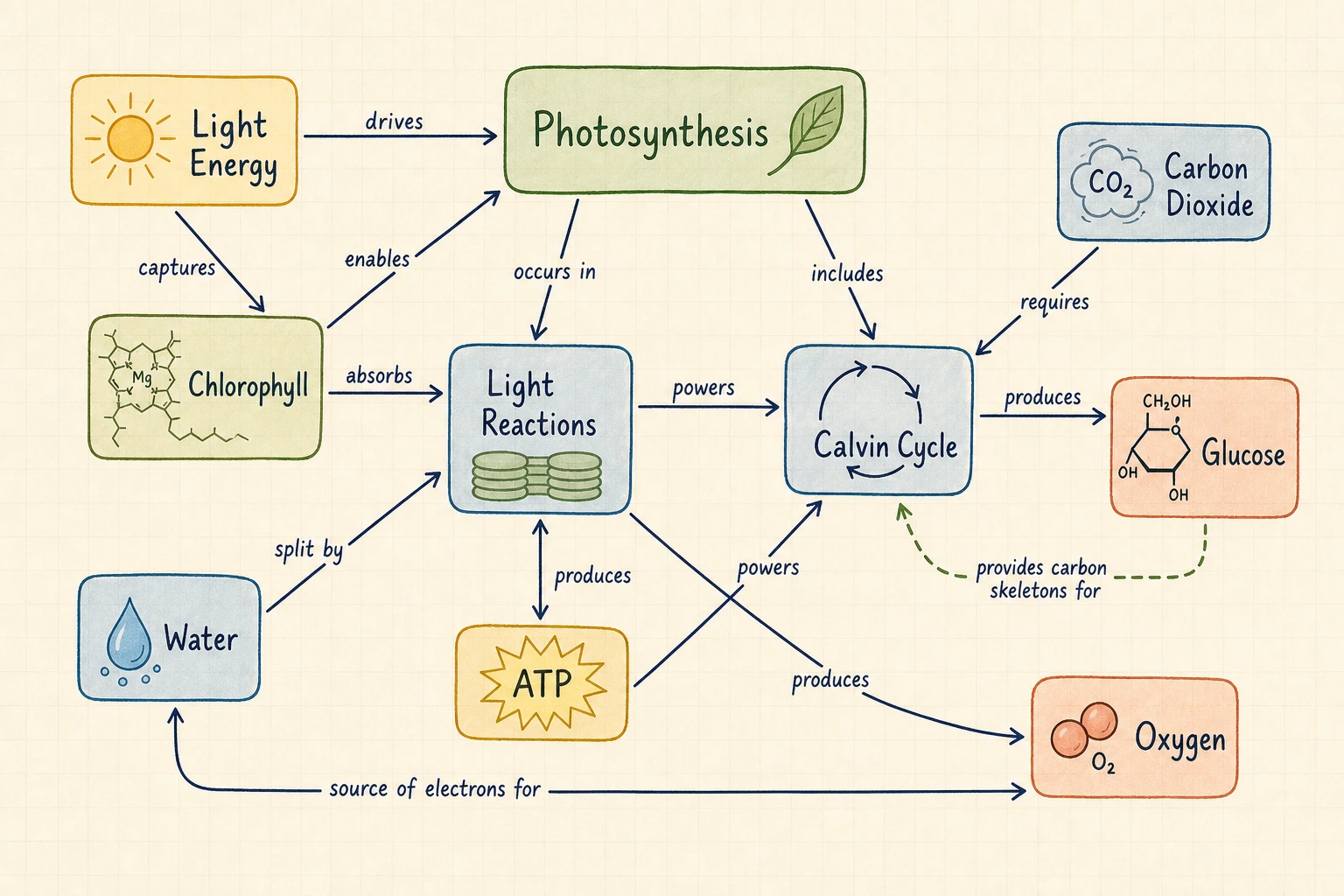
USE THE RIGHT KNOWLEDGE STRUCTURE
Multiple concepts, named relationships, and cross-links. Use it to explain systems, theories, causes, and evidence.
One central topic with radial branches. Use it to brainstorm, outline, revise, and group ideas quickly.
Use a labeled knowledge network when the meaning of each relationship matters as much as the concepts themselves.
02 CONCEPT MAP INTELLIGENCE
Connections use short phrases such as causes, requires, supports, includes, or leads to, so each path explains what the relationship means.
Cross-links join concepts in different regions, helping you see feedback loops, shared evidence, dependencies, and non-obvious relationships.
Open the result in FigEditor for image-level AI changes, annotations, cleanup, and another iteration based on the same source material.
Move from unstructured material to a visual explanation without placing and labeling every connection by hand.
Start with a complete network draft instead of manually adding every concept, connector, and relationship phrase. Faster first draft
Enter a topic or paste notes. No graph syntax, diagram code, or design experience is required. No code required
Choose the image model, aspect ratio, and resolution before generation so the cost stays predictable. Transparent workflow
A labeled connection makes the map easier to audit because each path can be read back as a sentence and checked against the source. Reviewable propositions
Download a high-resolution image for notes, lessons, papers, slide decks, workshops, reports, or planning documents. Presentation-ready
Name terminology that must stay unchanged, then verify every concept and linking phrase before publishing the visual. Human-reviewed output
Define the focus, list the concepts and relationships, then generate and review the labeled network.
Start with the question the map should explain. Add source notes when the concepts and terminology must follow supplied material.
Name the important ideas, relationship phrases, and cross-links. Mention anything the AI must not invent or rename.
Read each concept-link-concept path as a sentence. Check it against the source, then download the image or refine the visual in FigEditor.
Simple pricing
Choose a plan designed for the way you communicate research.
For individual researchers who need the complete visual workflow with a practical credit allowance
Start creatingFor researchers who need more iterations, commercial use, and every advanced visual workflow
Start creatingFor teams that need high-volume credits, commercial use, and support across the full workflow
Start creatingAn AI concept map generator turns a topic or source text into a network of concepts connected by labeled relationships. FigEditor asks the selected image model to create concepts, linking phrases, propositions, and supported cross-links that you can review and download as a visual draft.
Paste a focused source summary, identify the key concepts, and mention relationships that must appear. Generate the map, then read every concept-link-concept path as a sentence. Revise the description and generate again when a concept, label, direction, or cross-link is inaccurate.
A mind map starts from one central topic and radiates into mostly unlabeled parent-and-child branches. A concept map can connect several concepts, labels every relationship, and uses cross-links to join different regions. Use a mind map for brainstorming and outlining; use a concept map to explain exactly how ideas relate.
Revise the original topic or notes and generate another version when the knowledge structure or wording needs to change. You can also open the generated image in FigEditor for image-level AI edits, annotations, cleanup, and visual refinement. The current workflow does not provide node-level graph editing.
Yes. A concept map is a network rather than a strict single-root tree. One concept can relate to several others, and cross-links can connect different regions when the source supports those relationships. Name the required cross-links in your description for a more controlled result.
The current generator accepts a topic or pasted notes rather than a PDF upload. Extract or summarize the relevant PDF sections, keep important terminology, and paste that text into the Notes mode. Verify every generated concept and relationship against the original pages before using the map.
FigEditor displays the required credit amount on the Generate Concept Map button before generation, so the cost is visible before you submit. The total depends on the selected image model and resolution. Review the current pricing page for available plans, included credits, and purchasing options. View current plans and credits
Remove confidential, identifying, unpublished, or institution-restricted information before using any AI service. Use a short, de-identified summary when the source is sensitive, review FigEditor’s privacy policy, and follow your school or organization’s data-handling and research-ethics rules before generating a map. Read the privacy policy