
Structure the narrative
Organize background, methods, results, and conclusions into a readable scan path.
CONFERENCE POSTER WORKFLOW
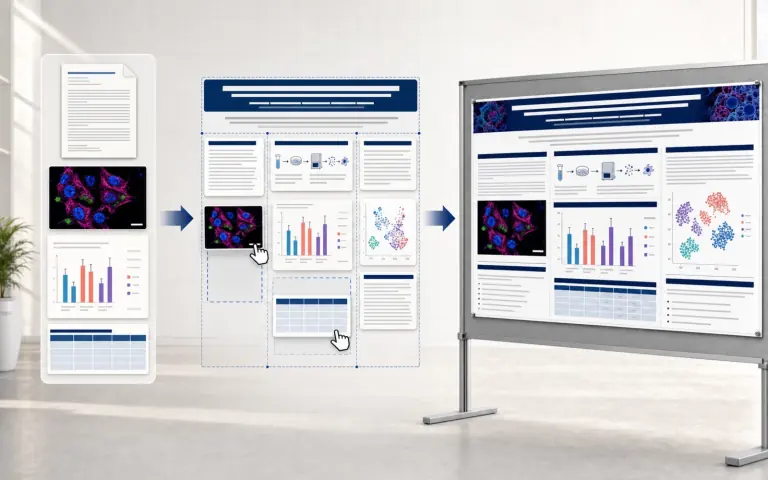
Turn an abstract, methods, findings, and visual assets into a conference-ready poster with balanced hierarchy, readable sections, and reusable layouts.
Scientific Poster Maker GENERATOR
What it is
Organize background, methods, results, and conclusions into a readable scan path.
Coordinate charts, illustrations, captions, and whitespace across the poster grid.
Create a polished visual draft for conference review and export.
Research examples
Explore methodology, system, and graphical-abstract directions, then reuse the closest visual structure for your own work.
Inside the workflow
Separate content planning, visual structure, rendering, and scientific review so each iteration has a clear purpose.
Finds visual references that match the research domain.
Turns the scientific context into a concise hierarchy.
Adapts color, typography, and density to academic norms.
Renders the planned diagram or scientific composition.
Reviews faithfulness, readability, and visual economy.
Use cases
Move from an early visual hypothesis to a polished methods figure, explanatory architecture, graphical abstract, or reviewed revision.

Workflow
Keep terminology, relationships, labels, and visual constraints explicit, then review the result against the source research.
Keep terminology, relationships, labels, and visual constraints explicit, then review the result against the source research.
Keep terminology, relationships, labels, and visual constraints explicit, then review the result against the source research.
Pricing
Plans for paper figures, graphical abstracts, lab workflows, and higher-volume scientific visuals.
Your first 3 figures are free, no card. Buy more only when you need it.
Try every tool before you pay.
$0forever
No card required
6 free credits
Added on your first Google sign-in · ≈3 figures
For researchers publishing regularly
$29/ month
Billed monthly, renews automatically.
450 credits / month
≈225 figures · Resets each billing cycle
Every paid plan includes
For labs producing figures every week
$49/ month
Billed monthly, renews automatically.
900 credits / month
≈450 figures · Resets each billing cycle
Every paid plan includes
Checkout is handled by Stripe. Card details never reach our servers.
FAQ
Answers about generation, editing, credits, export, and responsible academic use.
Use a focused research brief, verify every scientific label and claim, and continue refining the generated draft in FigEditor Studio before publication.
Use a focused research brief, verify every scientific label and claim, and continue refining the generated draft in FigEditor Studio before publication.
Use a focused research brief, verify every scientific label and claim, and continue refining the generated draft in FigEditor Studio before publication.
Use a focused research brief, verify every scientific label and claim, and continue refining the generated draft in FigEditor Studio before publication.